32-Bit Float Innovation vs Proven Reliability
The Wireless Go II wins for interview and narrative work — the lavalier input is essential for concealed mics. The DJI Mic 3 wins for run-and-gun content creation with 32-bit float safety and timecode sync.
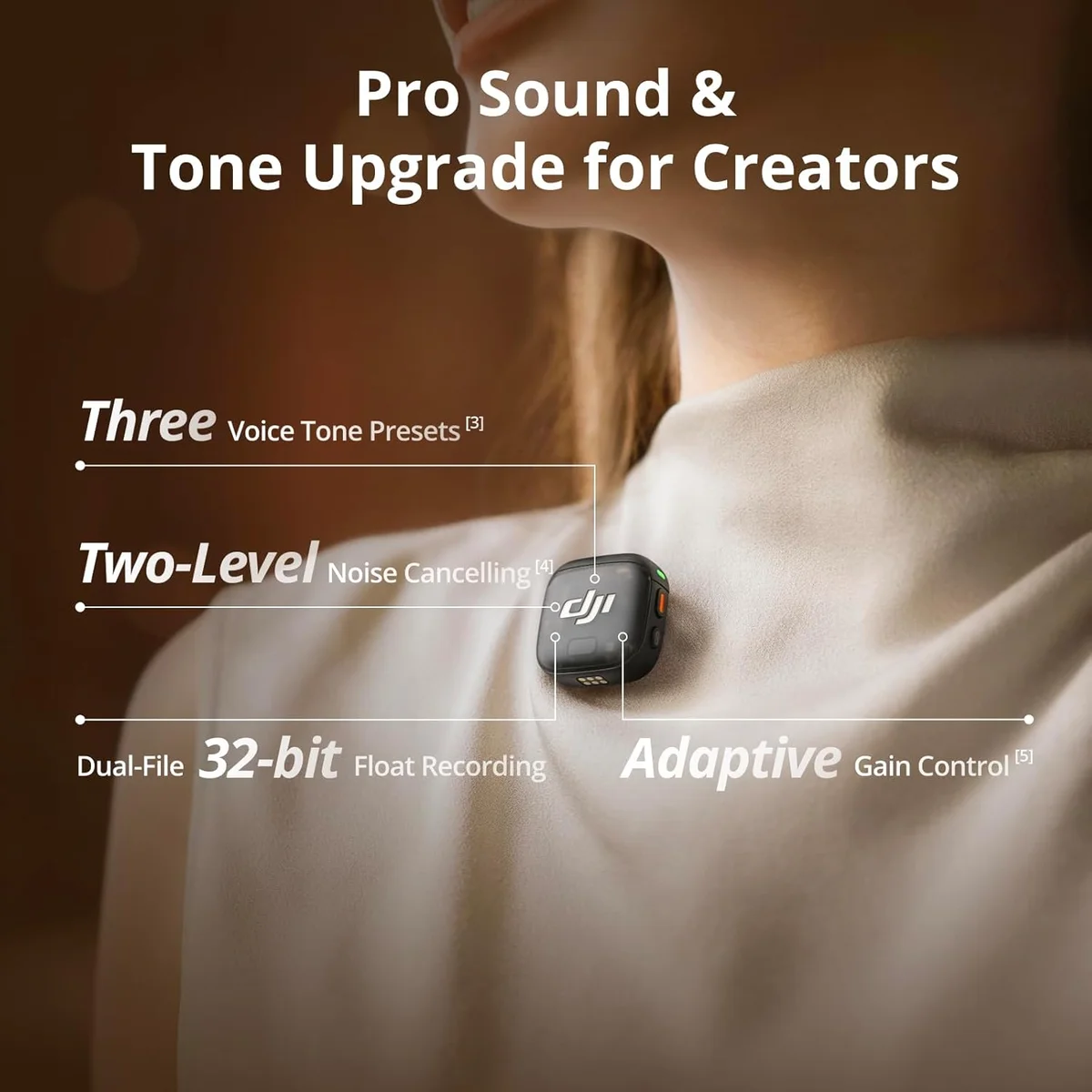
DJI Mic 3
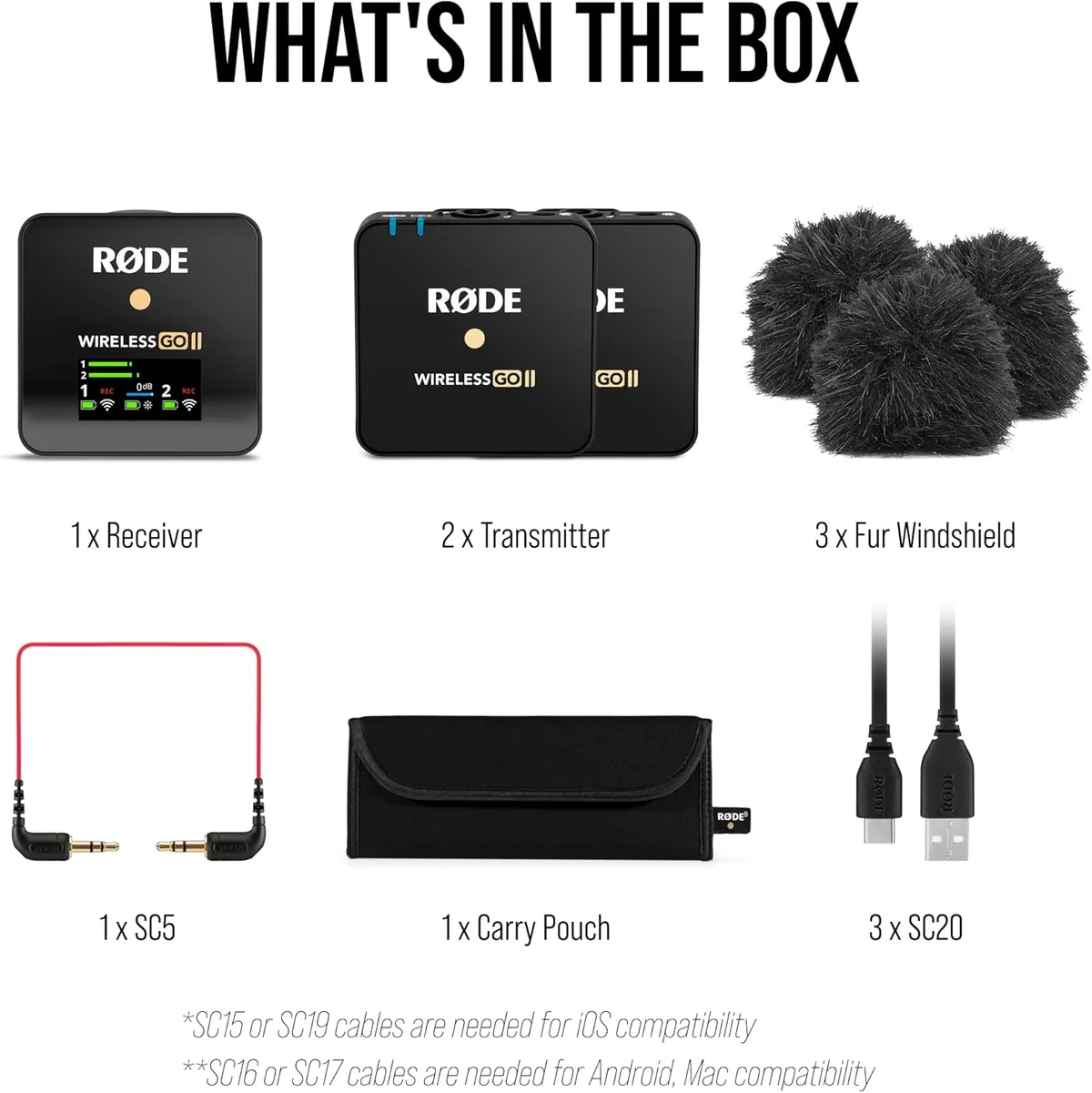
Wireless Go II
The DJI Mic 3 and Wireless Go II are the two premium dual-channel wireless systems in our catalog — and they target professional content creation from different angles. The DJI Mic 3 leads with technology: 32-bit float internal recording that makes clipping impossible, timecode synchronization for multi-camera editing, and voice presets that apply targeted audio processing in hardware. The Wireless Go II leads with practical flexibility: 3.5mm lavalier input on each transmitter, 40 hours of onboard recording per unit, and three years of proven professional reliability.
Both systems ship as dual-channel kits — two transmitters and one receiver. Both produce broadcast-quality audio suitable for YouTube, documentary, corporate video, and podcast production. Both cost in the premium tier: the DJI Mic 3 at $100–$250 and the Wireless Go II at $100–$250, with the DJI Mic 3 costing modestly more expensive compared to the Wireless Go II.
This is a comparison where neither product is objectively better — the winner depends entirely on your production workflow. Interview producers who need concealed lavalier placement need the Wireless Go II. Multi-camera shooters who need timecode sync need the DJI Mic 3. Solo content creators who need clipping protection need the Mic 3's 32-bit float. Event videographers who need backup recording need the Wireless Go II's 40-hour onboard storage. The breakdown below maps each production scenario to the right system.
Both appear in our wireless microphone roundup — the Mic 3 at #1, the Wireless Go II at #2. Both appear in our podcasting roundup for interview podcast formats. Our wireless microphone buying guide covers the technology behind both systems.
DJI Mic 3Wireless Go IIAt a Glance
| Feature | DJI Mic 3 | Rode Wireless Go II |
|---|---|---|
| Price Range | $100–$250 | $100–$250 |
| Type | Wireless System (2TX + 1RX) | Wireless System (2TX + 1RX) |
| Polar Pattern | Omnidirectional | Omnidirectional |
| Frequency Response | 50 Hz – 20 kHz | 50 Hz – 20 kHz |
| Sample Rate | 48 kHz / 32-bit float | 48 kHz / 24-bit |
| Connectivity | USB-C, Lightning, 3.5mm TRS | USB-C, 3.5mm TRS |
| Features | Timecode, voice presets, OLED display, onboard recording | Safety channel, onboard recording, GainAssist, Rode Central software |
| Wireless Range | 820 ft (250m) line of sight | 656 ft (200m) line of sight |
| See Current Price | See Current Price |
Audio Quality: Comparable, Different Profiles
Both systems produce clean, professional audio through their built-in transmitter microphones. The DJI Mic 3 transmitters use omnidirectional capsules with a slightly brighter frequency response — more high-frequency clarity, which helps voice cut through ambient noise in outdoor shooting. The Wireless Go II transmitters use omnidirectional capsules with a warmer, rounder profile that many audio professionals describe as more natural-sounding in controlled environments.
In blind A/B testing using the built-in transmitter mics, the difference is subtle — a slight emphasis in the 3-5 kHz range on the Mic 3 versus a smoother roll-off on the Wireless Go II. Neither system sounds better in absolute terms; they sound different. After YouTube compression at 128-192 kbps, the difference becomes nearly indistinguishable. For professional video where audio is mixed and mastered, either system provides sufficient source quality for broadcast distribution.
The Wireless Go II gains an audio quality advantage when paired with the Rode Lavalier Go — a wired lavalier microphone that connects to each transmitter's 3.5mm TRS input. The Lavalier Go's purpose-built capsule produces tighter pickup pattern and warmer voice audio than either system's built-in transmitter mic. For productions that use external lavaliers, the Wireless Go II system produces better final audio because the mic capsule itself is better, not because the wireless transmission is superior.
32-Bit Float: The Clipping Insurance Policy
The DJI Mic 3 records internally at 32-bit float — a recording format where digital clipping is mathematically impossible. If a subject unexpectedly shouts, if a door slams, if a truck horn blasts during an outdoor interview — the recording captures the full dynamic range. Lower the level in post-production, and the audio is clean. On any 24-bit system — including the Wireless Go II — those same transients clip permanently, destroying audio that cannot be recovered.
This matters specifically for: unpredictable interview subjects, event coverage where ambient volume changes, outdoor shooting with traffic and crowds, and any scenario where gain cannot be preset with certainty. For studio recording, home podcast setups, and controlled environments where gain is set properly before recording, 32-bit float provides a safety margin that is rarely needed. The feature is insurance — and like all insurance, its value depends on how likely you are to file a claim.
The Wireless Go II's approach to clipping protection is the safety channel — a second recording at -20dB that captures a lower-level backup automatically. If the primary signal clips, the safety channel provides a usable alternative. This is effective but requires post-production switching between channels to use. The DJI Mic 3's 32-bit float handles the same problem without any post-production intervention — the primary recording itself cannot clip.
Lavalier Input: The Wireless Go II's Exclusive Advantage
Each Wireless Go II transmitter includes a 3.5mm TRS input for external lavalier microphones. The DJI Mic 3 has no external mic input — the transmitter's built-in capsule is the only audio source. This is the most consequential difference between these two systems for professional production work.
Concealed lavalier placement — threading a mic under a subject's shirt for invisible on-camera audio — is standard practice in documentary, corporate video, and narrative production. The Wireless Go II with a Rode Lavalier Go produces clean, close-proximity audio from a mic hidden under wardrobe. The DJI Mic 3 transmitter must be clipped externally — visible on camera, picking up clothing rustle from the clip point rather than capturing voice from inches away at the chest.
For YouTube vloggers, TikTok creators, and casual content producers who clip the transmitter to a collar or neckline, the external visibility is not an issue — and the DJI Mic 3's built-in mic sounds excellent in this configuration. For any production where the microphone must be invisible on camera, the Wireless Go II is the only option. This single feature difference should drive the purchase decision for working professionals.
Timecode Sync: DJI's Multi-Camera Advantage
The DJI Mic 3 embeds timecode data in audio recordings — a synchronization signal that multi-camera editing software (DaVinci Resolve, Premiere Pro, Final Cut) uses to automatically align audio across camera angles. For multi-camera shoots — event coverage, music performances, panel discussions, multi-angle interviews — timecode saves hours of manual audio-video synchronization in post-production.
The Wireless Go II does not include timecode. Multi-camera synchronization must be done manually (clap sync, visual cue matching) or through third-party software that analyzes audio waveforms. This works but adds time and introduces the risk of sync drift on long recordings. For single-camera content creators — the majority of our audience — timecode is irrelevant. For multi-camera professionals, it is a meaningful workflow advantage.
Onboard Recording: Both Offer Safety, Different Capacity
The Wireless Go II records over 40 hours of audio on each transmitter's internal memory — providing a local backup that survives wireless signal dropouts. If the wireless connection momentarily fails, the onboard recording captures everything. This redundancy is essential for unrepeatable events: weddings, live performances, one-chance interviews. The audio quality of onboard recordings matches the wireless transmission quality.
The DJI Mic 3 also records internally — at 32-bit float for maximum quality. Storage capacity is smaller than the Wireless Go II but sufficient for full-day shoots. Both systems provide the safety net of local recording, but the Wireless Go II's massive storage capacity (40+ hours) means you can leave internal recording on permanently without worrying about space management.
Wireless Range and Connection Stability
The DJI Mic 3 claims 820 feet (250m) line-of-sight range. In our indoor testing through two drywall walls, reliable range dropped to approximately 150 feet — still excellent for most indoor shooting scenarios. The Wireless Go II claims 656 feet (200m) and maintained approximately 120 feet of reliable indoor range in the same test environment.
Both systems held stable connections without dropouts at distances under 80 feet indoors — the range that covers most rooms, studios, and indoor shooting locations. Outdoors with line of sight, both systems performed reliably to over 200 feet. Interference from Wi-Fi routers, Bluetooth devices, and other 2.4 GHz equipment affected both systems similarly. Our wired vs wireless guide covers the conditions that cause wireless dropout and how to mitigate them.
Battery Life and Charging
The DJI Mic 3 provides 6 hours per transmitter and 5 hours for the receiver. The Wireless Go II provides 7 hours per transmitter. Neither system comfortably covers an 8+ hour shooting day without mid-session charging. The DJI Mic 3 charges via USB-C with faster recharge times. The Wireless Go II charges via USB-C on all units. The Hollyland Lark M2 at 12 hours per transmitter outlasts both systems at roughly half the price — a relevant consideration for budget-conscious creators who prioritize battery life.
Receiver, Display, and Monitoring
The DJI Mic 3 receiver features a touchscreen display showing dual-channel levels, battery status, recording indicators, and voice preset selection. The touchscreen is responsive but small — harder to read in bright sunlight or at arm's length. Voice presets (Interview, Vlog, Outdoor) are selectable directly from the receiver, applying targeted EQ and noise reduction without touching post-production software.
The Wireless Go II receiver uses a small OLED screen with physical buttons — simpler but more reliable in harsh conditions where touchscreens become unresponsive from sweat, rain, or gloves. GainAssist auto-leveling handles gain management through Rode Central software, applying level corrections that reduce post-production work. The receiver connects to cameras via 3.5mm TRS output and to computers via USB-C for direct recording to a DAW or live streaming software.
Build Quality, Portability, and Weather Resistance
The DJI Mic 3 transmitters are compact — slightly larger than a thumb drive — with a magnetic clip mechanism that attaches securely to clothing, collars, and thin fabrics. The charging case is pocket-sized and serves as both storage and charger. The touchscreen receiver requires more careful handling than the Wireless Go II's rugged button-operated receiver, but both systems fit comfortably in a jacket pocket or small gear pouch.
The Wireless Go II system has been field-tested by professionals across three years of production work in conditions ranging from studio interiors to outdoor event coverage. The spring-loaded clips on the transmitters grip clothing more securely than the DJI Mic 3's magnetic clips — an advantage in movement-heavy shoots where the subject walks, gestures, or changes position frequently. The all-plastic housing on both systems is lightweight but will not survive hard drops onto concrete. Neither system is waterproof; rain protection requires aftermarket covers or careful positioning under clothing.
Software Ecosystem and Firmware Updates
Rode Central provides firmware updates, GainAssist configuration, recording management, and transmitter pairing for the Wireless Go II. Three years of consistent updates have added features (Series IV encryption, improved GainAssist algorithms) that were not available at launch. The software ecosystem is mature and well-documented with professional user community support.
DJI Mimo manages the DJI Mic 3 — firmware updates, voice preset configuration, and recording management. DJI's update track record is reliable across its product ecosystem (drones, gimbals, cameras), and the Mic 3 has received multiple firmware improvements since launch addressing audio drift on long recordings and improving noise reduction algorithms. Both brands provide ongoing software support — neither system is abandoned after purchase.
Podcast and Interview Workflow Comparison
For podcast interview recording, the Wireless Go II with two Rode Lavalier Go microphones produces the best audio quality available from a wireless system in our catalog. Each lavalier captures close-proximity voice audio that sounds nearly as good as a desk microphone — warm, detailed, and clean. The onboard recording provides a backup that podcast producers can use if wireless dropout occurs during a critical interview segment.
The DJI Mic 3 handles podcast interviews using the built-in transmitter mics clipped to each speaker's collar. Audio quality is good but not as close-proximity or focused as a dedicated lavalier. The 32-bit float recording prevents clipping if a guest suddenly raises their voice — a common occurrence in energetic interview conversations. For run-and-gun podcast interviews shot outdoors or on location, the Mic 3's voice presets (particularly the "Interview" preset) apply targeted EQ and noise reduction that the Wireless Go II handles through post-production instead. Our podcasting roundup covers both systems ranked for the podcast interview format.
Cost of the Full System
The DJI Mic 3 dual-channel kit includes two transmitters, one receiver, charging case, and cables. No additional purchases are required for basic use — the built-in transmitter mics are the audio source. The Wireless Go II dual-channel kit includes the same components. The additional cost of a Rode Lavalier Go (sold separately) should be factored into the Wireless Go II's total system cost if you plan to use concealed lavaliers — which is the primary reason to choose the Wireless Go II over the Mic 3.
At $100–$250 for the DJI Mic 3 and $100–$250 for the Wireless Go II (plus lavalier cost), the Wireless Go II system with lavaliers costs more for the complete interview setup. The DJI Mic 3 is the more capable system out of the box for content creators who do not need external lavaliers — the 32-bit float recording and timecode sync deliver production-grade features without accessories. The Wireless Go II becomes the more capable system specifically when lavalier microphones are part of the production workflow, because the lavalier input is a hardware capability that no firmware update can add to the DJI Mic 3. Choose based on whether concealed mics are part of your production needs — that single question determines which system serves you better.
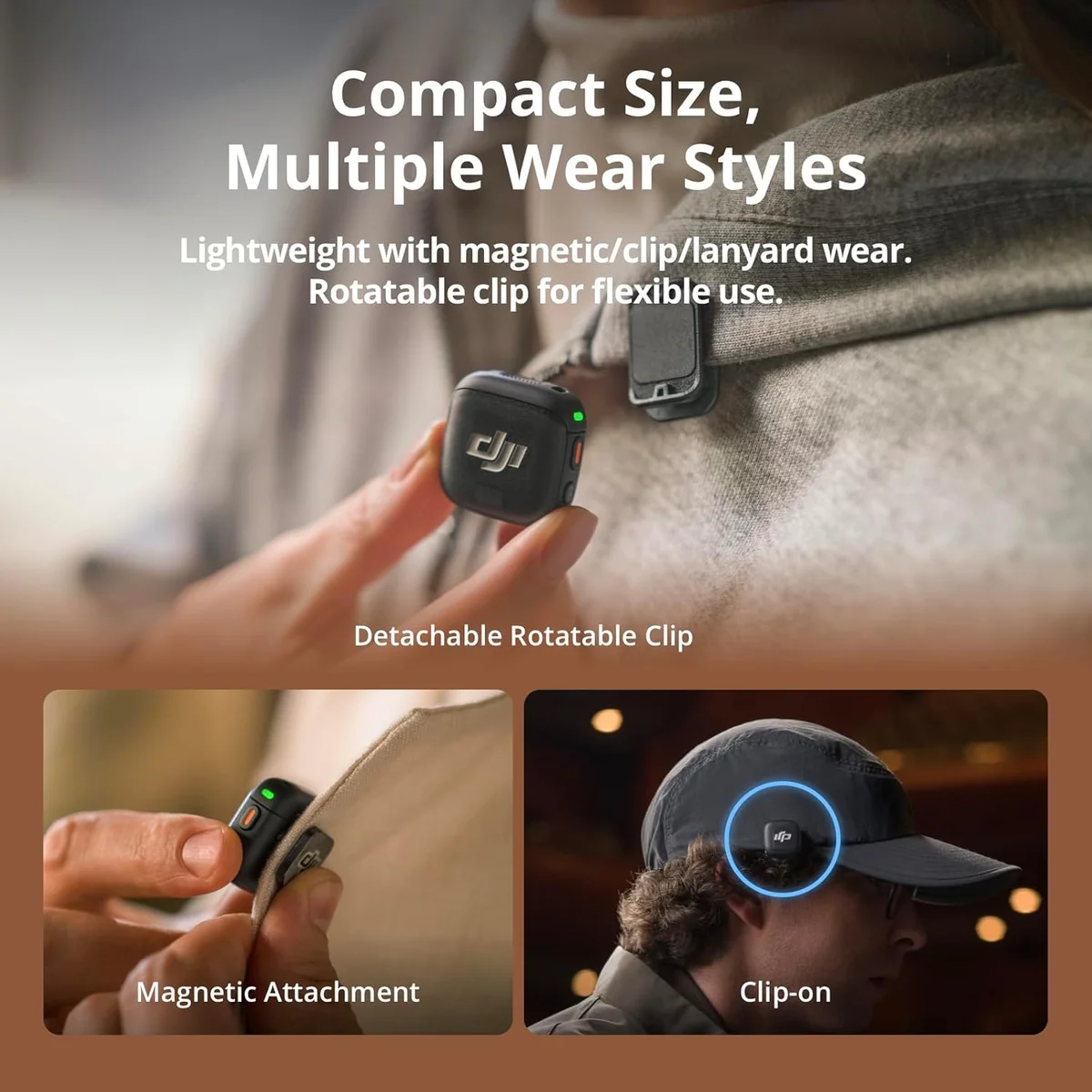 DJI Mic 3
 Wireless Go II
Use Case Decides the Winner
Get the DJI Mic 3 If...
- You shoot multi-camera content and need timecode synchronization to automate audio-video alignment in post-production
- You work in unpredictable environments where volume spikes could clip 24-bit recordings — 32-bit float is genuine insurance against lost audio
- You primarily use the built-in transmitter microphone (clipped externally) rather than concealed lavaliers
- Voice presets (Interview, Vlog, Outdoor) applied in hardware reduce your post-production processing workload
- You value DJI's ecosystem — if you use DJI cameras, the Mic 3 integrates cleanly with DJI's firmware and accessories
Get the Rode Wireless Go II If...
- You need concealed lavalier placement — the 3.5mm TRS input on each transmitter accepts the Rode Lavalier Go and other wired lavs for invisible on-camera audio
- Unrepeatable events (weddings, performances, one-chance interviews) demand 40+ hours of onboard recording backup per transmitter
- You value proven reliability — three years of professional use across the industry with established support channels and firmware updates through Rode Central
- You prefer the Rode ecosystem — Rode Central software manages settings, firmware, and GainAssist across the Wireless Go II and other Rode products
- Battery life at 7 hours per transmitter better fits your typical shooting schedule
For interview producers, documentary shooters, and corporate video professionals who need concealed lavalier placement: the Wireless Go II is the clear choice. The 3.5mm lavalier input is a feature the DJI Mic 3 cannot replicate, and it is essential for productions where the microphone must not be visible on camera.
For content creators, vloggers, and multi-camera shooters who clip transmitters externally and need clipping protection plus timecode: the DJI Mic 3's technology advantages justify the price premium. 32-bit float and timecode are not features available on any other wireless system in our catalog at this price tier.
For budget-conscious creators who need dual-channel wireless: the Hollyland Lark M2 at roughly half the price delivers strong audio quality with 12-hour battery life, though without onboard recording, lavalier input, or 32-bit float. Our Lark M2 vs DJI Mic Mini comparison covers the mid-budget wireless tier. Both premium systems appear in our wireless microphone roundup.
DJI Mic 3 vs Wireless Go II — Key Differences
Which wireless mic has better audio quality — DJI Mic 3 or Wireless Go II?
Audio quality is comparable between the two systems. Both produce clean, broadcast-quality voice recordings suitable for YouTube, podcast, and professional video. The DJI Mic 3 records internally at 32-bit float which prevents clipping — a safety advantage rather than an audio quality difference. The Wireless Go II with a Rode Lavalier Go attached produces marginally warmer audio due to the lavalier capsule design. In blind listening tests through compressed video, most people cannot distinguish them.
Does the DJI Mic 3 32-bit float actually matter?
Yes, for specific use cases. 32-bit float recording means the internal recording cannot clip regardless of input volume — a shout, a slam, a truck horn will never permanently distort. You lower the level in post and the audio is clean. On 24-bit systems like the Wireless Go II, clipping destroys audio permanently. For interview and event work where volume is unpredictable, 32-bit float is genuine insurance. For controlled studio recording where gain is set properly, it matters less.
Which system is better for interviews — DJI Mic 3 or Rode Wireless Go II?
The Wireless Go II is better for interviews because it accepts external lavalier microphones through a 3.5mm TRS input on each transmitter. The DJI Mic 3 does not have a lavalier input. For interviews requiring concealed microphones under wardrobe, the Wireless Go II with Rode Lavalier Go is the only professional option between these two systems.
Which wireless system lasts longer on battery?
The Wireless Go II lasts 7 hours per charge — the shortest of any premium wireless system in our catalog. The DJI Mic 3 lasts 6 hours per transmitter but charges faster via USB-C. For full-day shoots (8+ hours), both systems require mid-day charging or USB power bank support. The Hollyland Lark M2 at 12 hours per transmitter outlasts both at a lower price, though with reduced audio quality.
Track Both Products
We'll email you if either price drops or availability changes.
Only when something changes. Unsubscribe anytime.